
Milestone Electronics
XGA Switcher with Scan Mode
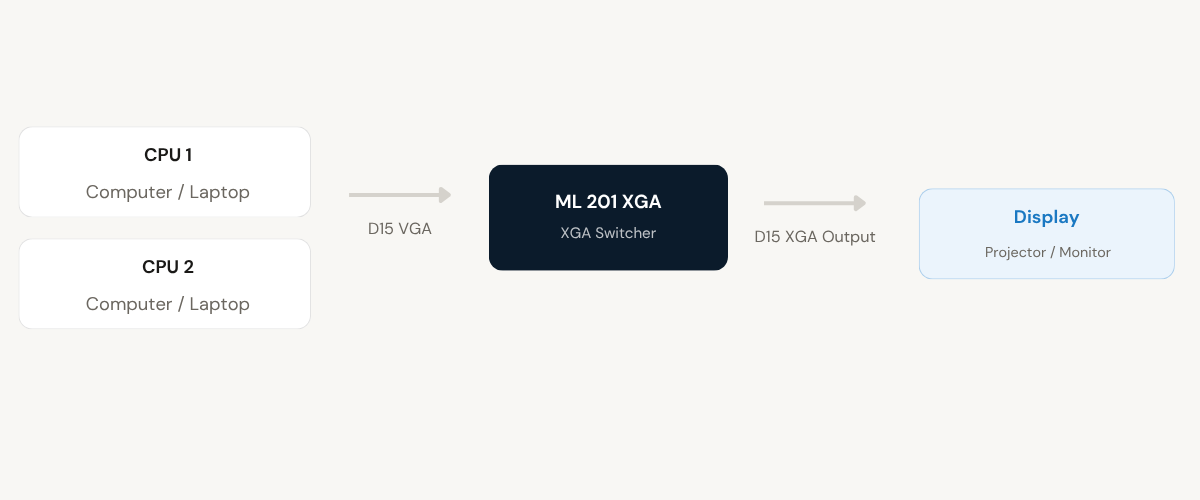
The ML 201 XGA allows two computers or laptops to share a single projector or monitor. With plug-and-play installation, multiple selection modes including Scan, and full compatibility with VGA, SVGA, and XGA displays, it is a straightforward solution for shared display environments.
- 1 composite AV input distributed to 4 independent AV outputs
- Audio and video signals transmitted together without delay or mismatch
- Each output individually managed and amplified for consistent signal strength
- Video bandwidth up to 90 MHz (-3dB) with 75-ohm impedance matching
- Rugged metal enclosure with captive screw audio connectors for fixed installations
Max Resolution
1080p Full HD
Audio Input
Stereo Analogue
Output
Single HDMI
- In-house manufactured
- 2,000+ clients served
Product Overview
What the ML 201 XGA delivers
The ML 201 XGA is a two-input XGA switcher that enables two computers or laptops to share a single projector or monitor without the need to physically reconnect cables. It uses D15F connectors on both input and output sides and operates on standard 230V AC mains, making it compatible with typical office and presentation infrastructure.
The switcher supports three operating modes. In Manual mode, the operator selects the active channel using the front panel keypad or via an optional remote keypad, remote contact closure, or RS232C interface. Auto mode applies a priority-based selection: the channel with the lowest number that has an active sync signal is selected automatically. If two sources are active simultaneously, the one with the higher priority is displayed until it becomes inactive.
Scan mode continuously cycles through only those input channels that have an active connection. The scan interval is adjustable via a rear-panel knob from 10 seconds up to 7 minutes, allowing operators to set a suitable dwell time based on the presentation or monitoring requirement. This mode is particularly useful in environments where content from both connected sources needs to be displayed in sequence.
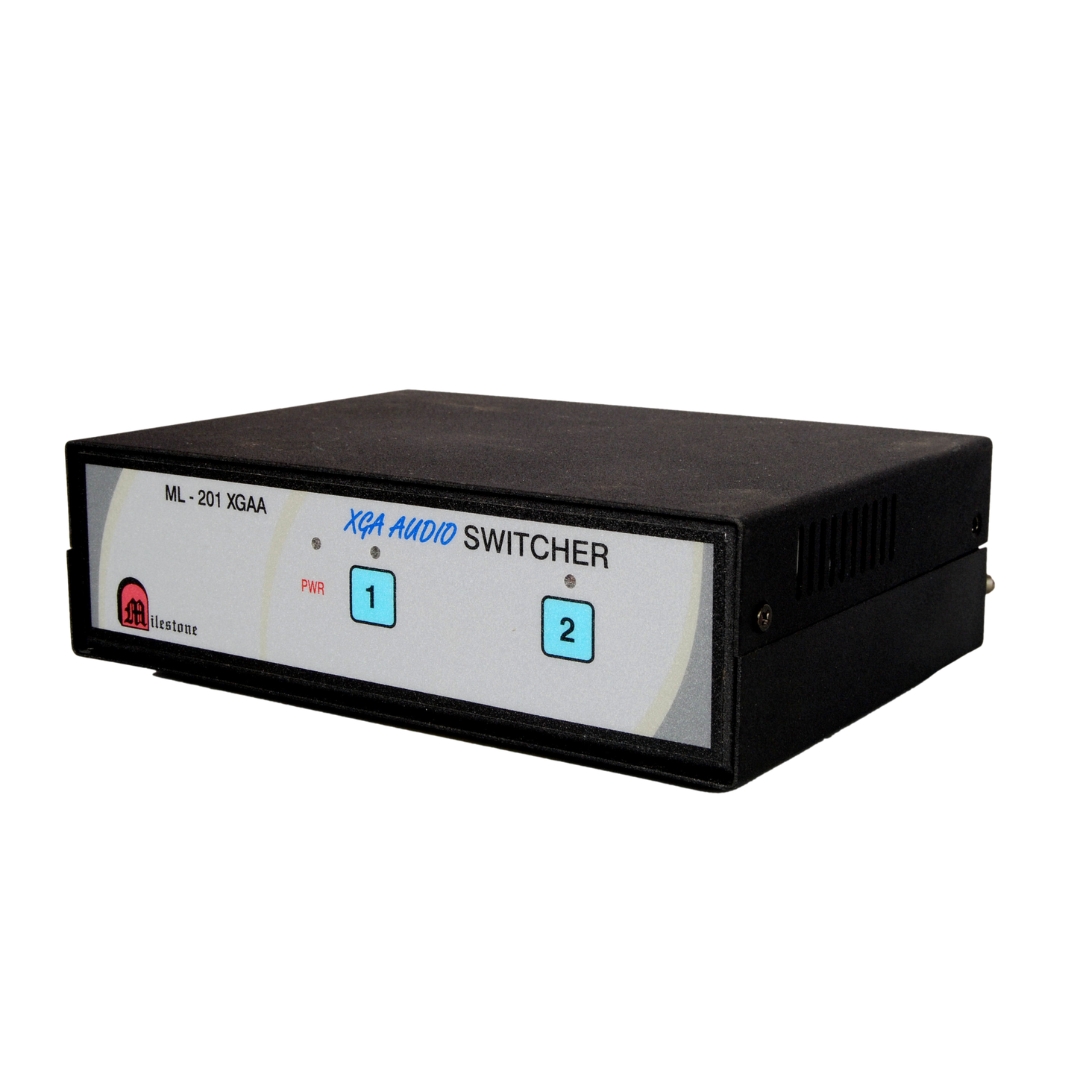
The ML 201 XGA is fully compatible with VGA, SVGA, and XGA monitors and projectors, making it suitable for use with a wide range of display hardware. LED indicators on the front panel show which channel is currently active. The unit has a tabletop form factor with dimensions of 288 x 130 x 52 mm and weighs 1600 g.
Inputs
Need a quote?
Our team responds within 24 hours with a tailored quote for your project or bulk order.
Key Features
Flexible switching with multiple control modes
The ML 201 XGA combines plug-and-play ease with versatile channel selection options, adjustable scan timing, and broad display compatibility for shared projection environments.
2-CPU to 1-Display Sharing
Allows two computers or laptops to share a single projector or monitor without cable disconnection. The active source is selected through any of the available control methods, keeping the shared display operational at all times.
- Two D15F inputs for connecting two CPU or laptop sources
- Single D15F output to projector or XGA monitor
- Plug-and-play installation with no software required
Multiple Channel Selection Methods
The active channel can be selected from the front panel keypad, an optional remote keypad, remote contact closure at up to 50 metres, or RS232C serial interface. This range of options accommodates installations where direct panel access is not always practical.
- Front panel keypad for local selection
- Remote keypad or contact closure via D9 male connector (up to 50 metres)
- RS232C interface for computer-controlled switching (9600 baud, 8-bit, 1 stop)
Adjustable Scan Mode
Scan mode cycles through all connected input channels automatically. The dwell time per channel is adjustable using a rear-panel knob, ranging from 10 seconds to 7 minutes. Only active input channels are included in the scan cycle, preventing blank screens from inactive sources.
- Scan interval adjustable from 10 seconds to 7 minutes
- Only connected channels are included in the scan cycle
- Rear-panel knob for scan timing adjustment
Auto Priority-Based Switching
In Auto mode, the switcher monitors sync signals from all connected inputs and activates the highest-priority channel that is live. Channel 1 holds first priority, followed by Channel 2. If both channels are simultaneously active, Channel 1 is selected and Channel 2 can only be accessed once Channel 1 becomes inactive.
- Automatic channel selection based on sync signal detection
- Priority order: Channel 1 then Channel 2
- No manual intervention required for source switching
Broad Display Compatibility
The ML 201 XGA is fully compatible with VGA, SVGA, and XGA monitors and projectors. This ensures the switcher can be integrated into existing display setups without replacing or upgrading the connected display hardware.
- Supports VGA, SVGA, and XGA resolution standards
- Works with projectors and monitors using standard D15 connections
- No compatibility limitations for common professional display equipment
LED Status Indication
Front-panel LED indicators show which input channel is currently selected and confirm that the unit is powered and operating. A dedicated power LED and individual channel LEDs allow the operator to confirm the active source at a glance without needing to inspect the connected equipment.
- Individual LEDs for Channel 1, Channel 2, and power status
- Immediate visual confirmation of the active input
- Useful in low-light presentation and control environments
Installation
Plug-and-play setup with flexible control options
The ML 201 XGA is designed for easy installation. Connect the sources and display, select the operating mode via the rear-panel slide switch, and the unit is ready to operate. No software or drivers are required.
01
Hardware Connection
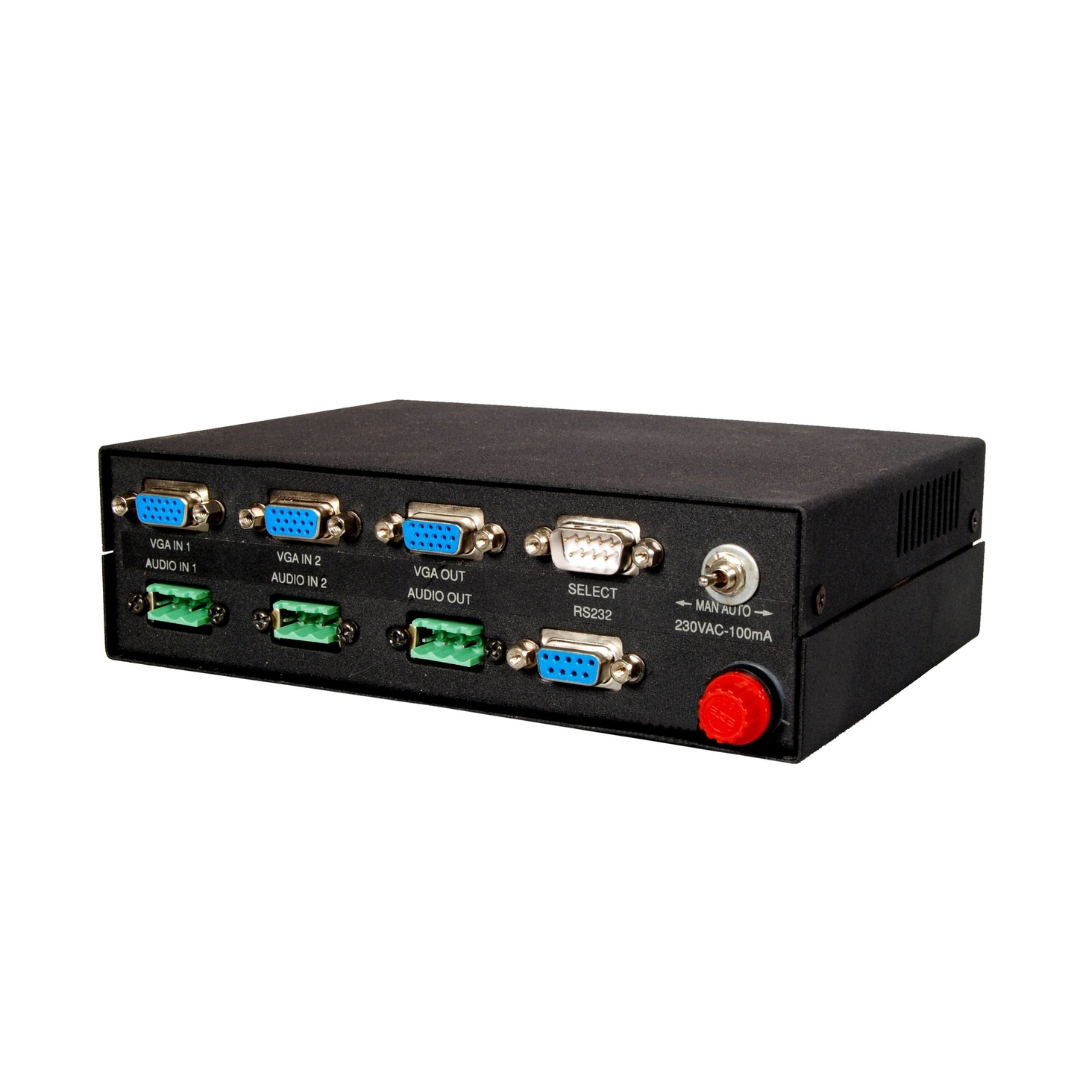
Connect up to two computers or laptops to the D15F input connectors on the rear panel. Connect the single D15F output to the projector or XGA monitor. Connect the 230V AC mains supply. The unit supports an operating cable distance of up to 30 metres between the switcher and connected devices.
02
Selecting the Operating Mode
Use the rear-panel slide switch to set the unit to Manual, Auto, or Scan mode. In Manual mode, channels are selected via the front keypad or optional remote. In Auto mode, the switcher selects the active channel based on sync detection. In Scan mode, adjust the timing knob on the rear panel to set how long each active channel is displayed before cycling to the next.
03
Optional Remote Control Setup
For remote channel selection, connect Milestone's remote keypad or a third-party contact closure device to the D9 male connector on the rear panel. Short the respective pin to ground (pin 9) to activate the corresponding channel. Remote operation is supported up to 50 metres from the switcher unit.
04
RS232C Serial Control (Optional)
For computer-controlled switching, connect to the D9 female RS232 port on the rear panel. Use pin 3 for Rx and pin 5 for ground. Send the channel command in the format "channel number followed by !" at 9600 baud, no parity, 8-bit, 1 stop bit. The switcher returns the selected channel number on pin 2 as confirmation feedback.
Where the ML 201 XGA performs
Designed for environments where two computers need to share a single display output, with flexible switching controls suited to both attended and unattended setups.
Corporate Boardrooms
Allows multiple presenters to share a single boardroom projector from their own laptops. Switching between sources is handled at the front panel keypad or via optional remote, without requiring cable swaps between presenters.
Classrooms and Training Rooms
Connects an instructor's computer and a student or guest laptop to a shared classroom projector. The Auto or Manual mode allows the instructor to quickly switch the displayed source during lessons or practical demonstrations.
Control and Monitoring Stations
In control rooms or monitoring stations, the Scan mode cycles through two connected sources on a single display, allowing operators to observe output from both systems in sequence. Scan timing can be set to match the monitoring workflow.
Exhibition and Demo Setups
Trade show booths and product demonstration setups benefit from Scan mode, which automatically rotates content from two source machines on a single display. This removes the need for manual operator intervention during extended display periods.
AV Equipment Rack Installations
When source computers are rack-mounted or in a separate equipment room, the optional RS232C interface or remote contact closure allows operators to switch the active input from a distance of up to 50 metres, keeping the switcher integrated into the overall AV control system.
Shared Workstation Environments
In hot-desking or shared workstation setups, two employees can share one monitor without unplugging cables. The front panel keypad provides quick manual selection, and LED indicators confirm which machine is currently active on the shared display.
Full specification sheet
- Model Information
- Connectors
- Display Compatibilit
- Operating Modes
- Channel Selection
- RS232 Interface (Optional)
- Physical and Electrical
FAQs about the ML 201 XGA Switcher
What is the ML 201 XGA used for?
The ML 201 XGA is an XGA switcher that allows two computers or laptops to share a single projector or monitor. Rather than physically reconnecting cables each time a different source needs to be displayed, the switcher allows the operator to select the active input through the front panel keypad or via optional remote control methods. It is suited to presentation rooms, training environments, and shared workstations.
What operating modes does the ML 201 XGA support?
The switcher supports three modes. Manual mode allows the operator to select the active channel using the front panel keypad, optional remote keypad, contact closure, or RS232C interface. Auto mode monitors sync signals from connected inputs and selects the highest-priority active channel automatically. Scan mode cycles through all active connected channels at a timing interval that can be adjusted from 10 seconds to 7 minutes using a rear-panel knob.
How does Auto mode work when both inputs are active simultaneously?
In Auto mode, the switcher assigns priority to Channel 1 first and Channel 2 second. If sync signals are detected on both channels at the same time, Channel 1 is selected because it holds higher priority. Channel 2 can only become active once Channel 1 no longer has a detected sync signal. This ensures predictable behaviour when multiple sources are running simultaneously.
Can the switcher be controlled from a distance?
Yes. The ML 201 XGA supports remote channel selection via the D9 male connector on the rear panel. Milestone’s remote keypad or any contact closure device can be connected at this port and operated from up to 50 metres away. To select a channel remotely, the corresponding pin for that channel is shorted to ground (pin 9). For computer-controlled environments, the optional RS232C interface on the D9 female port allows switching commands to be sent over a serial connection.
What monitors and projectors is the ML 201 XGA compatible with?
The ML 201 XGA is fully compatible with VGA, SVGA, and XGA monitors and projectors. Any display device with a standard D15 input that supports these resolution standards will work with the switcher. This covers most professional projectors and monitors used in presentation and AV environments, meaning no special display hardware is required.
How is the RS232C interface used to control the switcher?
The RS232C interface uses the D9 female connector on the rear panel with pin 3 as the receive (Rx) line and pin 5 as ground. Communication parameters are 9600 baud, no parity, 8-bit data, and 1 stop bit. To select Channel 1, the command “1!” is sent; for Channel 2, the command is “2!”. After each selection, the switcher sends back the selected channel number on pin 2 as a confirmation, allowing the controlling system to verify that the command was received and executed correctly.
Does the ML 201 XGA require any software installation?
No. The ML 201 XGA is a plug-and-play device and does not require any software or driver installation on the connected computers. Source devices are connected to the D15F input ports, the display is connected to the D15F output port, and the unit is powered via the 230V AC mains supply. The operating mode is selected using the rear-panel slide switch, and switching is performed through the front keypad or the optional control interfaces.
What is the maximum cable distance supported by the ML 201 XGA?
The ML 201 XGA supports an operating distance of up to 30 metres between the switcher and the connected devices. This applies to the signal cables between the source computers and the switcher, as well as the cable from the switcher to the display output. For remote control via the contact closure or remote keypad interface, the connection can extend up to 50 metres from the rear-panel D9 male connector.
Products you may also need
Ready to order or have a specific requirement?
Our team responds within 24 hours. Bulk pricing, custom solutions, and pan-India delivery are available. Talk to an engineer directly about your setup.