
Milestone Electronics
HDMI IR Over Fibre
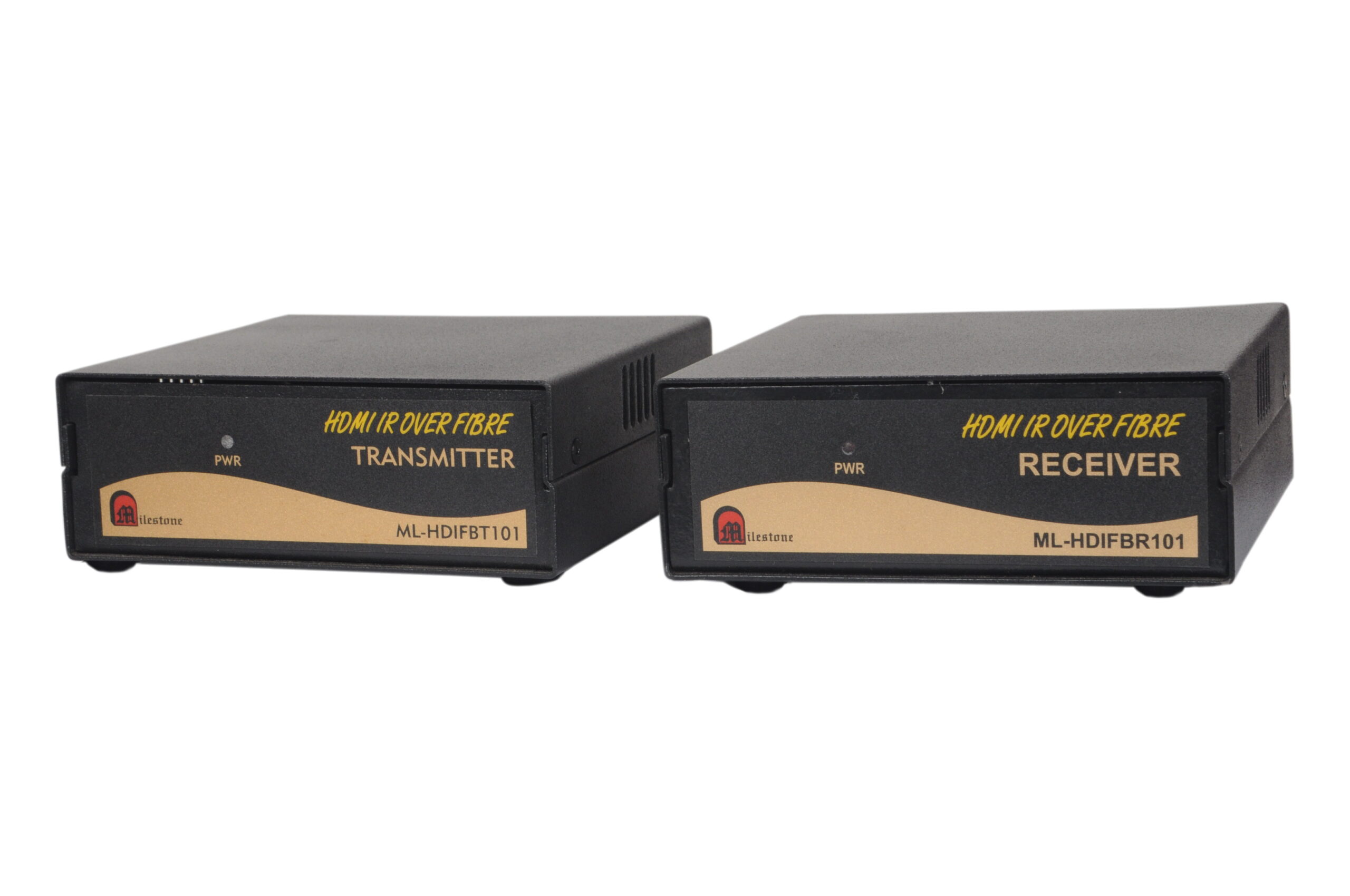
The ML-HDIFBT101 and ML-HDIFBR101 transmit HDMI video and IR control signals over a single mode, single SC fibre cable to distances of up to 10 kilometres, delivering stable 1080P Full HD output and HDCP-compliant performance over long-haul fibre runs.
- Transmits HDMI and IR signals up to 10 km over single mode, single fibre SC cable
- Supports resolutions up to 1080P Full HD with HDCP compliance
- Six LED indicators on the rear panel for instant power and fibre link status monitoring
- Compatible with all standard HDMI ports, plug-and-play installation
- Reset switch provided on both units for recovery from abnormal display conditions
Max Resolution
1080p Full HD
Audio Input
Stereo Analogue
Output
Single HDMI
- In-house manufactured
- 2,000+ clients served
- In-house manufactured
- 24hr response
- 2,000+ clients served
Product Overview
What the ML-HDIFBT101 and ML-HDIFBR101 deliver
The HDMI IR Over Fibre system from Milestone Electronics consists of two units: the ML-HDIFBT101 Transmitter and the ML-HDIFBR101 Receiver. Together, they extend HDMI video and IR control signals over a single mode, single fibre SC cable to distances of up to 10 kilometres. This makes it a purpose-built solution for installations where HDMI source equipment and display devices are separated by very long distances that standard copper-based extenders cannot cover.
The system supports video output up to 1080P Full HD and is HDCP compliant, ensuring compatibility with protected content sources. The plug-and-play design requires no complex configuration and works with all standard HDMI ports on both source and display equipment.
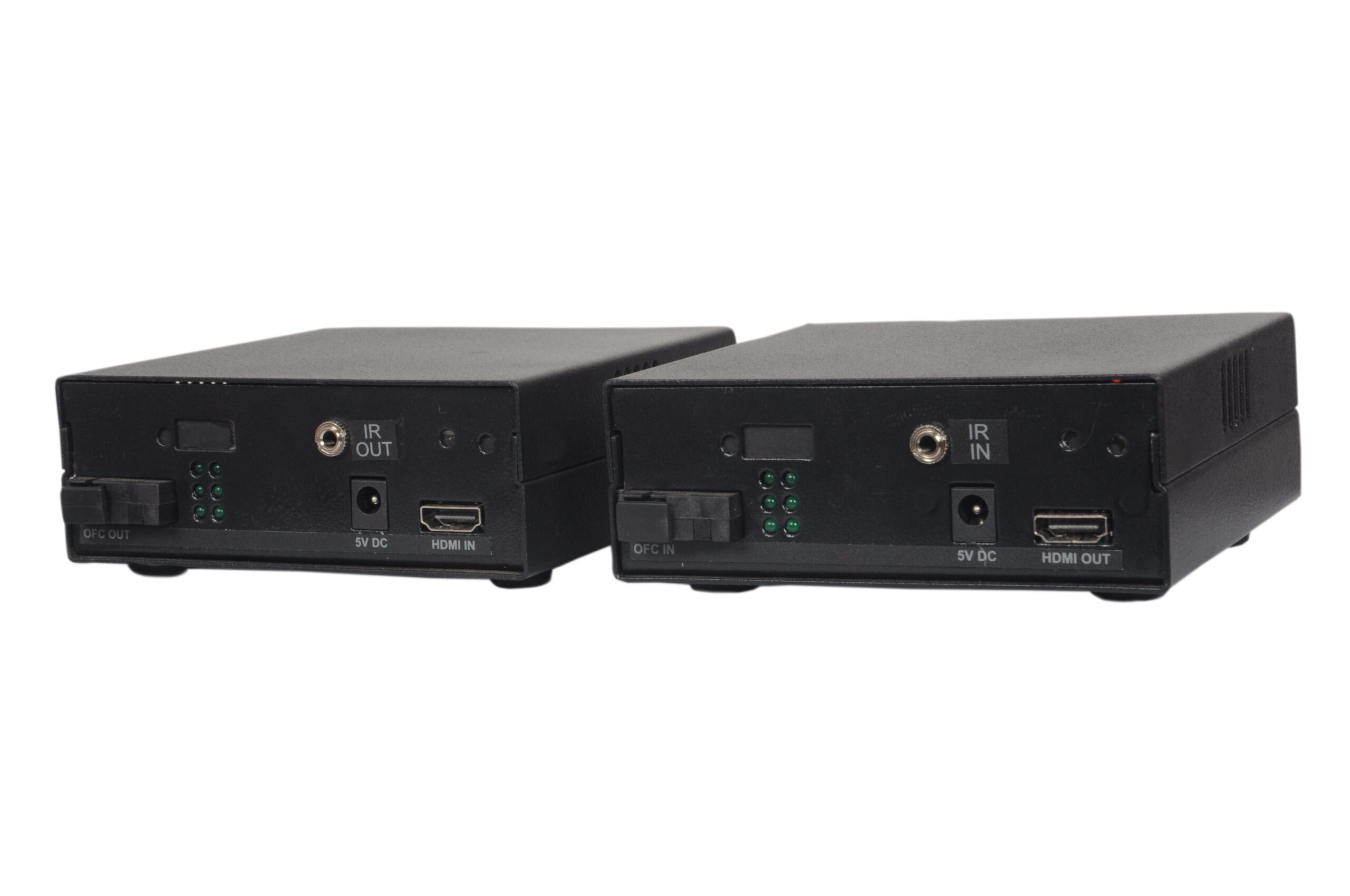
Both units feature six LED indicators on the rear panel displaying real-time status for power, Fdx/co, Fx Link/Act, Tx Link/Act, Fx100, and Tx100. This allows engineers and AV technicians to verify link health at a glance without requiring additional diagnostic equipment. A reset switch is also provided on each unit to recover from any abnormal display conditions that may occur after initial connection.
In addition to HDMI video, the system carries IR signals. An optional IR LED cable can be connected at the IR OUT port on the Transmitter, and an optional IR Sensor cable at the IR IN port on the Receiver, enabling remote control of the HDMI source device from the display location. Note that the IR LED and IR Sensor cables are not supplied with the units and must be sourced separately.
Model (RX)
Need a quote?
Our team responds within 24 hours with a tailored quote for your project or bulk order.
Key Features
Long-haul HDMI and IR extension over single mode fibre
HDMI video and IR control signals over a single SC fibre cable, supporting 1080P Full HD output up to 10 km with HDCP compliance and real-time status monitoring.
10 km HDMI Extension over Single Mode Fibre
The system transmits HDMI signals over single mode, single fibre SC cable to distances of up to 10 kilometres. This is substantially beyond the reach of copper-based Cat extenders, making it suitable for long-haul AV distribution in large campuses, multi-building facilities, or industrial sites.
- Up to 10 km range over single mode SC fibre cable
- Single fibre cable carries both HDMI and IR signals
- Suitable for inter-building and campus-scale deployments
1080P Full HD Video with HDCP Compliance
The extender supports video resolutions up to 1080P Full HD and is HDCP compliant, ensuring compatibility with content protection on Blu-ray players, media servers, set-top boxes, and other HDCP-enabled source devices. Video quality is maintained consistently over the full fibre run.
- Supports up to 1080P Full HD resolution
- HDCP compliant for protected content compatibility
- Compatible with all standard HDMI ports
Optional IR Signal Extension
The system supports optional IR signal extension between the Transmitter and Receiver. An IR LED cable connected at the IR OUT port of the Transmitter and an IR Sensor cable at the IR IN port of the Receiver allow operators to send remote control commands from the display location back to the HDMI source device over the fibre link.
- IR LED cable connects at IR OUT on Transmitter (optional accessory)
- IR Sensor cable connects at IR IN on Receiver (optional accessory)
- Enables source device control from the remote display location
Six LED Status Indicators
Both the Transmitter and Receiver units feature six LED indicators on the rear panel, providing instant visual status monitoring for power, Fdx/co, Fx Link/Act, Tx Link/Act, Fx100, and Tx100. This enables technicians to quickly verify the operational state of each unit and the fibre link without additional test equipment.
- Six LEDs per unit for comprehensive link and power status
- Monitors Fdx/co, Fx Link/Act, Tx Link/Act, Fx100, and Tx100 states
- Supports fast fault identification during installation and operation
Plug-and-Play Operation with Reset Function
The system is designed for easy plug-and-play installation with no software configuration required. Both units include a rear-mounted reset switch to restore normal operation if an abnormal display condition is detected after connecting all cables and displays. This simplifies deployment and reduces on-site troubleshooting time.
- No software or drivers required for operation
- Reset button on rear of each unit for display recovery
- Works with all standard HDMI-equipped source and display devices
Single Fibre SC Cable Architecture
The system uses a single SC fibre connector on both the Transmitter and Receiver, requiring only one fibre cable run for the complete HDMI and IR link. This reduces installation complexity and cabling cost compared to multi-fibre solutions, particularly over long distances in multi-building or infrastructure-level deployments.
- Single SC fibre connector on each unit
- One cable carries both video and IR signal traffic
- Reduces cabling cost over long-distance installations
Installation
Simple setup with flexible mounting options
The ML 104 AV Splitter is designed for plug-and-play operation and can be integrated into a wide range of AV and surveillance environments without complex configuration.
01
Connect the HDMI Source to the Transmitter
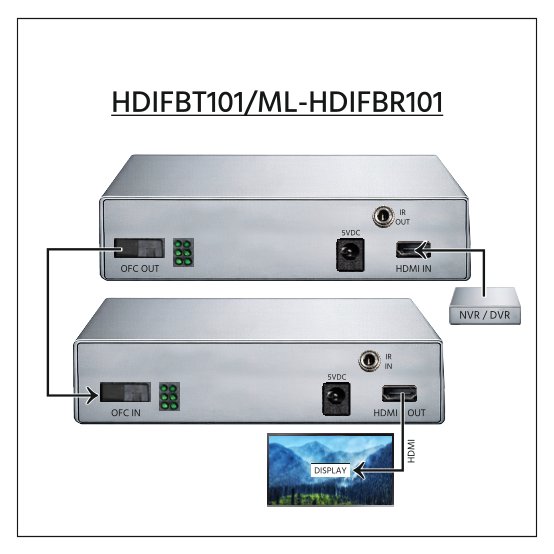
Connect the HDMI output of the source device (such as a media player, PC, or set-top box) to the HDMI input port on the ML-HDIFBT101 Transmitter. If IR control is required, connect an IR LED cable to the IR OUT port on the Transmitter. Note that the IR LED cable is an optional accessory and is not supplied with the unit.
02
Link the Transmitter and Receiver via SC Fibre Cable
Connect one end of a single mode, single SC fibre cable to the SC Fibre Connector on the ML-HDIFBT101 Transmitter. Connect the other end to the SC Fibre Connector on the ML-HDIFBR101 Receiver. The cable carries both the HDMI and IR signals over the full fibre run of up to 10 kilometres.
03
Connect the Display and Optional IR Sensor to the Receiver
Connect the HDMI display unit (monitor, projector, or screen) to the HDMI Out port on the ML-HDIFBR101 Receiver. If IR control is required at the display location, connect an optional IR Sensor cable to the IR IN port on the Receiver. The IR Sensor cable is not supplied with the unit and must be sourced separately.
04
Power On Both Units
Apply 5V/2A power to both the Transmitter and Receiver units. Both units will begin operating automatically. Verify the operational status using the six LED indicators on the rear panel of each unit. If an abnormal display condition is observed after connecting all equipment, press the reset button on the rear of the affected unit to restore normal operation.


Where the ML-HDIFBT101 and ML-HDIFBR101 perform
Designed for professional environments where HDMI signals must be distributed reliably over very long distances using existing or new single mode fibre infrastructure.
Multi-Building Campus AV Distribution
Distribute HDMI video from a central AV room to displays located in separate buildings on a campus. The 10 km fibre range eliminates the need for intermediate signal repeaters or multiple conversion stages across long campus cable routes.
Control Rooms and Command Centres
Deliver HDMI video feeds from remotely located server rooms or equipment floors to operator workstations in control centres. IR extension allows operators to manage source devices from their monitoring stations without physical access to the source equipment room.
Educational Institutions
Extend HDMI content from a centrally managed media library or AV control room to lecture halls, auditoriums, or classrooms spread across a large institution. The fibre link ensures stable signal delivery regardless of distance between the source and the display area.
Large Venue and Auditorium Installations
Transmit HDMI signals from backstage or projection booths to large screens and display panels in concert halls, conference centres, or stadiums. The single mode fibre cable handles the extended distances common in large venue infrastructure without signal degradation.
Broadcast and Production Facilities
Connect HDMI video sources in production control rooms to displays or monitoring stations located in different areas of a broadcast facility. The HDCP-compliant link supports protected content sources commonly used in broadcast and media production environments.
Industrial and Infrastructure Sites
Deploy HDMI extension in factories, power plants, or infrastructure facilities where display monitors are positioned far from centralised control equipment. Single mode fibre is resistant to electromagnetic interference common in industrial environments, ensuring reliable signal transmission.
Full specification sheet
- Transmitter — ML-HDIFBT101
- Receiver — ML-HDIFBR101
- Signal Extension
- Video and Compliance
- Suitable Environments
FAQs about the HDMI IR Over Fibre
What is the HDMI IR Over Fibre (ML-HDIFBT101 and ML-HDIFBR101) used for?
The HDMI IR Over Fibre system is used to transmit or distribute HDMI video and optional IR control signals from a source device to a display over distances of up to 10 kilometres using a single mode, single SC fibre cable. It consists of two units: the ML-HDIFBT101 Transmitter and the ML-HDIFBR101 Receiver. It is designed for installations where source and display equipment are separated by distances that exceed the capabilities of standard copper-based HDMI extenders.
What type of fibre cable is required for this system?
The system requires a single mode, single fibre SC cable. Both the Transmitter and the Receiver are fitted with SC Fibre Connectors, and only one fibre cable is needed to carry both the HDMI and IR signals between the two units. Multi-mode fibre cable is not specified for this product and the single mode SC cable type must be used to achieve the stated 10 km transmission distance.
What video resolutions does this extender support?
The ML-HDIFBT101 and ML-HDIFBR101 support video resolutions up to 1080P Full HD. The system is also HDCP compliant, which means it is compatible with source devices that output HDCP-protected content, such as Blu-ray players, set-top boxes, and media servers. Both units maintain the same maximum resolution of 1080P Full HD.
Is IR control included with the units, and what cables are needed?
IR control is supported as an optional feature on both units. The ML-HDIFBT101 Transmitter has an IR OUT port for an IR LED cable, and the ML-HDIFBR101 Receiver has an IR IN port for an IR Sensor cable. However, the IR LED cable and IR Sensor cable are not supplied with the units and must be obtained separately. IR control is not mandatory for HDMI video operation and can be added when remote source device control from the display location is required.
What does the reset button on each unit do?
Both the Transmitter and Receiver have a reset switch located on the rear panel. This switch should be pressed if any abnormal display condition is observed after all cables and displays have been connected and both units have been powered on. The reset function restores normal operation without requiring the user to disconnect and reconnect the fibre or HDMI cables, and is part of the standard troubleshooting procedure recommended in the product manual.
What information do the LED indicators on each unit display?
Each unit has six LED indicators on the rear panel that provide real-time status monitoring. These LEDs display the status of power, Fdx/co (full-duplex or collision), Fx Link/Act (fibre link activity), Tx Link/Act (transmit link activity), Fx100 (fibre 100 Mbps), and Tx100 (transmit 100 Mbps). This allows installers and technicians to confirm power-on status and verify the health of the fibre link at a glance without requiring separate diagnostic equipment.
Does the system work with any HDMI source and display device?
Yes. The system is compatible with all standard HDMI ports on both source and display devices. Installation is plug-and-play, requiring no software configuration or drivers. The HDMI input on the Transmitter accepts any HDMI-equipped source device, and the HDMI output on the Receiver connects to any standard HDMI-compatible display, monitor, or projector. HDCP compliance ensures that protected content sources are also supported.
What power supply is required for each unit?
Both the ML-HDIFBT101 Transmitter and the ML-HDIFBR101 Receiver require a 5V/2A power supply. Each unit is powered independently, so two power supplies are needed for a complete installation. Both units must be powered on for the system to operate. Power should be applied to both units after all HDMI and fibre connections have been made.
Products you may also need
Ready to order or have a specific requirement?
Our team responds within 24 hours. Bulk pricing, custom solutions, and pan-India delivery are available. Talk to an engineer directly about your setup.