
HDMI Extenders over CAT6
HDMI and IR Extender over CAT6, 1080P, 120 Metres
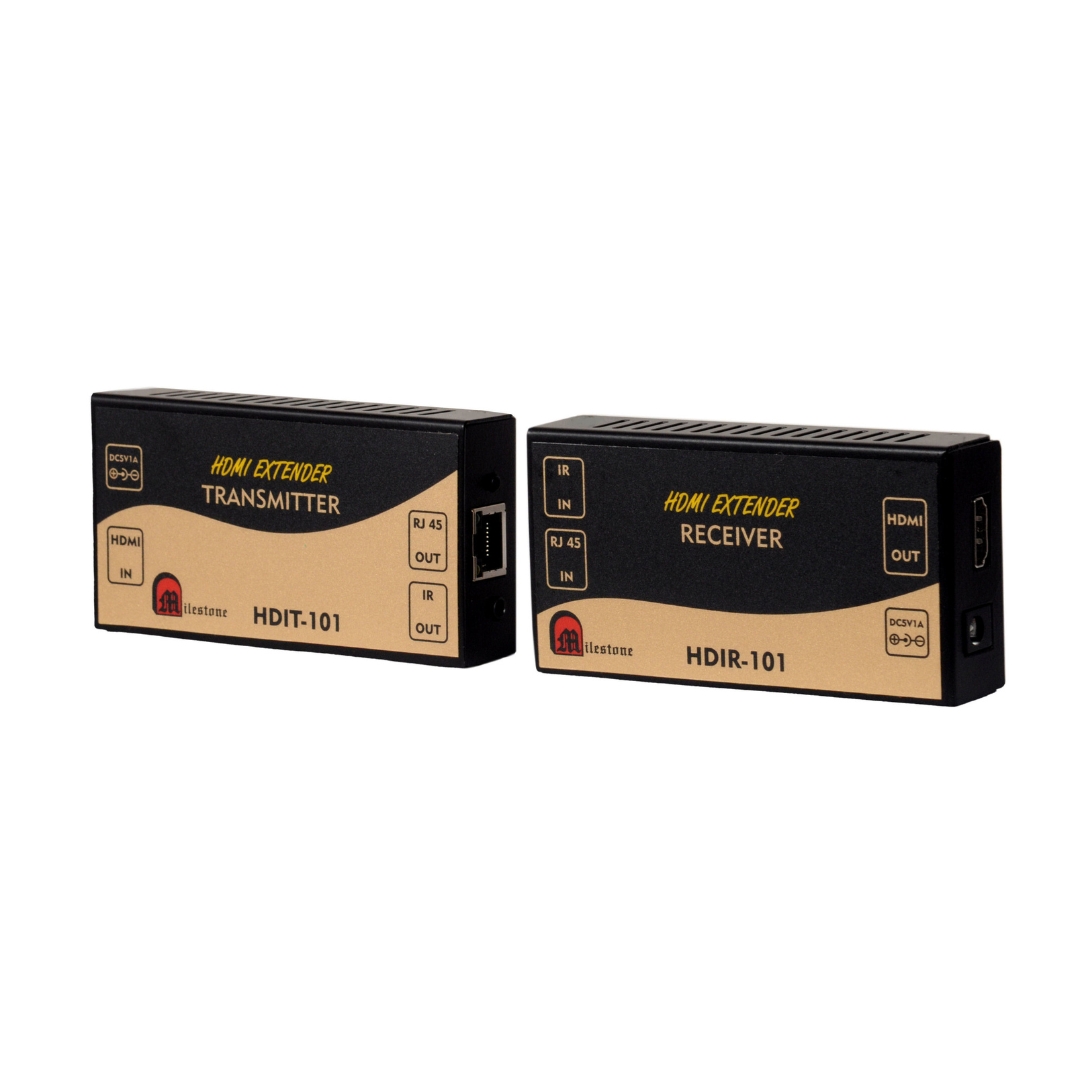
The ML-HDIT-101 and ML-HDIR-101 extend HDMI video and IR control signals up to 120 metres over a single CAT6 cable. Supports 1 to 1 and 1 to many distribution through a standard Ethernet switch. Plug and play with no configuration required.
- Extends HDMI and IR signals up to 120 metres over a single CAT6 cable
- Supports 1 to 1 and 1 to many output configurations via Ethernet switch
- Supports video resolutions up to 1080P Full HD
- HDCP compliant for protected content compatibility
- Works with all HDMI ports. Plug and play installation
Max Resolution
1080p Full HD
Audio Input
Stereo Analogue
Output
Single HDMI
- In-house manufactured
- 2,000+ clients served
- In-house manufactured
- 24hr response
- 2,000+ clients served
Product Overview
What makes the ML-HDIT-101 and ML-HDIR-101
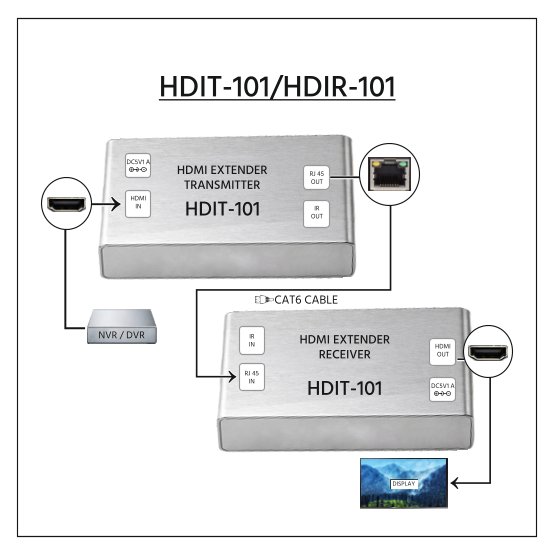
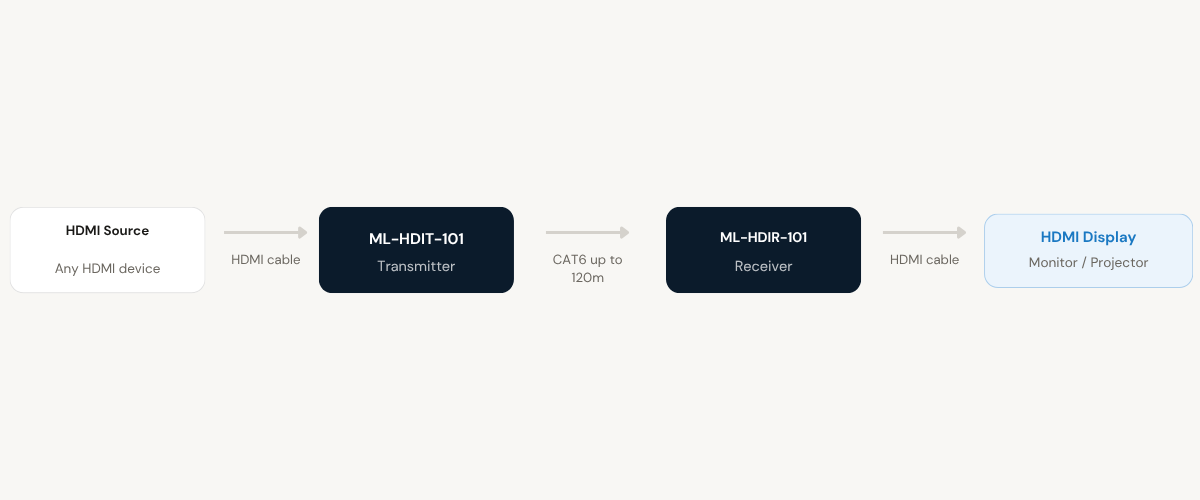
The ML-HDIT-101 and ML-HDIR-101 form a complete HDMI IR extender system designed to transmit or distribute HDMI signals over distances up to 120 metres using a single CAT6 cable. The system consists of two units: the ML-HDIT-101 transmitter, which connects to the HDMI source, and the ML-HDIR-101 receiver, which connects to the HDMI display at the remote end.
In addition to HDMI video, the system also extends IR (infrared) control signals. The IR Out LED cable connected at the transmitter and the IR In sensor connected at the receiver allow operators at the display end to send remote control commands back to source equipment located at the transmitter location. This is useful in installations where source devices are placed in centralised equipment rooms or locked AV cabinets.
The extender supports HDMI video resolutions up to 1080P Full HD and is HDCP compliant, ensuring compatibility with copy-protected content from broadcast and media playback sources. The CAT6 cable used conforms to the standard IEEE-568B wiring specification.
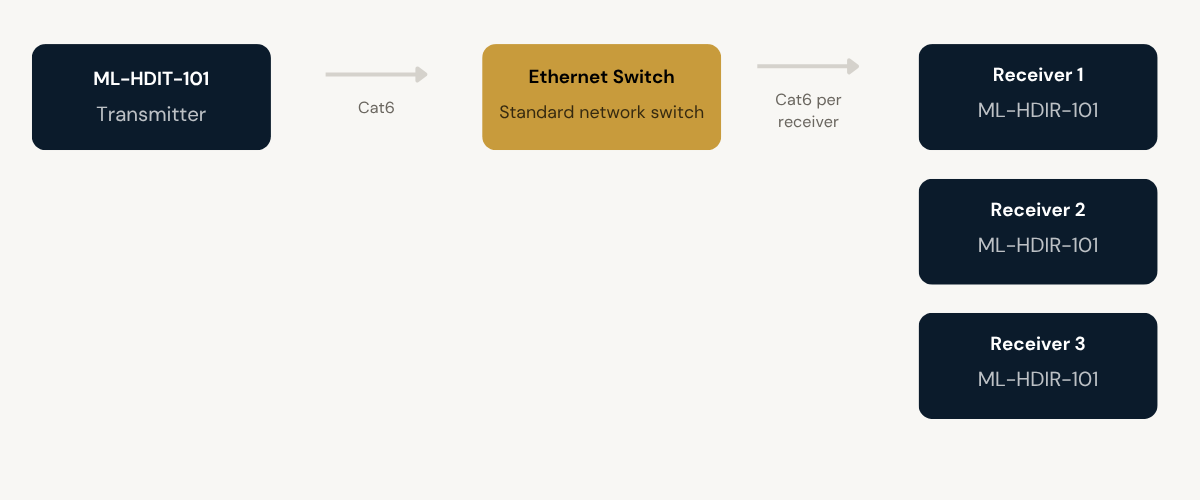
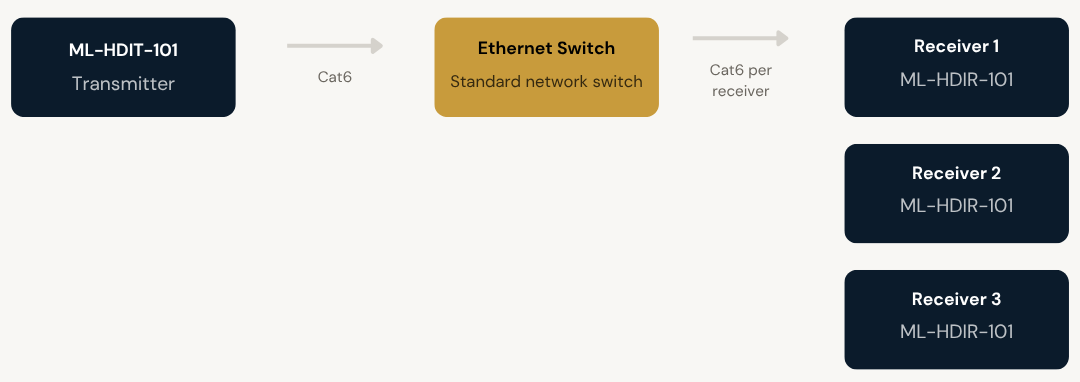
The system supports two deployment configurations: one to one, using a single transmitter and a single receiver connected directly by CAT6, and one to many, using one transmitter feeding multiple receivers through a standard Ethernet switch. Both the transmitter and receiver units include a reset button for use in situations where abnormal display behaviour is observed after connecting all displays.
Receiver Model
Need a quote?
Our team responds within 24 hours with a tailored quote for your project or bulk order.
Key Features
Built for long-distance HDMI and IR distribution
120 metres over CAT6. 1080P Full HD. IR return path. Scalable to multiple displays through a standard Ethernet switch.
120 Metre HDMI Extension over CAT6
The extender transmits HDMI signals up to 120 metres using a single CAT6 cable conforming to IEEE-568B standards. This allows source equipment to be placed far from displays without signal degradation, using structured cabling already present in most commercial buildings.
- Up to 120 metres over a single CAT6 cable
- Conforms to IEEE-568B CAT6 cabling standard
- Compatible with existing structured network cabling infrastructure
1080P Full HD Video Support
The system supports HDMI video resolutions up to 1080P Full HD on both the transmitter and receiver. This makes it suitable for professional displays, projectors, and monitors used in corporate, educational, and AV environments requiring high-resolution video output.
- Supports video resolutions up to 1080P Full HD
- Compatible with all standard HDMI ports
- Consistent resolution maintained at full extension distance
IR Signal Extension with Return Path
The system extends IR control signals alongside the HDMI feed. The IR Out LED cable at the transmitter end and the IR In sensor at the receiver allow remote control commands to be sent from the display location back to source devices installed at the transmitter end. This enables full remote control of source equipment from the operator position.
- IR Out LED cable connected at the transmitter
- IR In sensor connected at the receiver
- Enables remote control of source equipment from the display end
HDCP Compliant
Both the transmitter and receiver are HDCP compliant, ensuring uninterrupted transmission of copy-protected HDMI content from sources such as Blu-ray players, set-top boxes, media streamers, and broadcast equipment that enforce HDCP handshaking.
- Full HDCP compliance on transmitter and receiver
- Compatible with protected media content sources
- No signal interruption due to HDCP handshake failure
1 to Many Distribution via Ethernet Switch
For installations requiring multiple display outputs, one transmitter can distribute HDMI signals to multiple receivers by connecting through a standard Ethernet switch. Each receiver independently drives a connected HDMI display, making this configuration suitable for multi-screen environments.
- Metal housing for durability and protection
- Captive screw connectors for secure audio termination
- Suitable for rack mounting or under-desk installation
Plug and Play. Works with All HDMI Ports
The extender requires no drivers, software, or configuration. It is compatible with all standard HDMI ports and is ready for use immediately after connecting source, CAT6 cable, display, and power. A reset button on both units is available for use if abnormal display behaviour is observed.
- No software or driver installation required
- Compatible with all HDMI-equipped source and display devices
- Reset button on both TX and RX for quick fault recovery
Installation
One to one or one to many
The ML-HDIT-101 and ML-HDIR-101 support two installation configurations: a direct point-to-point setup between one transmitter and one receiver, or a one to many setup using an Ethernet switch to feed multiple receivers from a single transmitter.
01
One to One Configuration
Connect the HDMI source to the HDMI input of the ML-HDIT-101 transmitter. Connect the IR Out LED cable to the IR Out connector on the transmitter. Connect one end of the CAT6 cable to the RJ45 port on the transmitter and the other end to the RJ45 port on the ML-HDIR-101 receiver. Connect the HDMI display to the HDMI Out port of the receiver. Connect the IR In sensor cable to the IR In connector on the receiver. Apply 5V/1A power to both units.
02
One to Many via Ethernet Switch
Connect the HDMI source to the HDMI input of the ML-HDIT-101 transmitter. Connect the IR Out LED cable to the IR Out connector on the transmitter. Connect one end of a CAT6 cable from the RJ45 Out of the transmitter to the input port of a standard Ethernet switch. Connect the required number of ML-HDIR-101 receivers to the Ethernet switch using individual CAT6 cables. Connect an HDMI display and an IR In sensor cable to each receiver unit. Apply 5V/1A power to the transmitter and each receiver. Press the reset button on any unit if abnormal display output is observed after connecting all displays.

Where the ML-HDIT-101 and ML-HDIR-101 perform
Suited to any installation where HDMI sources need to reach displays at distances beyond standard cable limits, with or without multi-display distribution.
Conference Rooms and Board Rooms
Extend HDMI from presentation laptops or media players in AV cabinets to large displays or projectors at the far end of a conference room. IR extension allows presenters to control source devices from the display end without moving to the source location.
Schools and Educational Institutions
Route HDMI from a teacher's workstation or media player to classroom displays over CAT6 cabling. The 1 to many configuration allows a single source to feed multiple screens across a classroom or across multiple rooms simultaneously.
Corporate Training Rooms
Distribute HDMI content from a central source to multiple training room displays through a single Ethernet switch. Trainers can control playback devices remotely using IR without needing physical access to source equipment in the equipment room.
Control Rooms and Monitoring Stations
Extend HDMI signals from centralised source systems to operator display stations at distances up to 120 metres. The IR control path allows operators to interact with source equipment from their monitoring position without being physically co-located with the hardware.
AV Rack to Display Installations
Ideal for installations where AV source equipment is rack-mounted in a separate equipment room and HDMI needs to reach displays in a hall, lobby, or meeting room. The CAT6 run replaces long and costly HDMI cable runs.
Digital Signage Distribution
Distribute a single HDMI content source to multiple signage displays spread across a building or floor using the 1 to many configuration via Ethernet switch. The plug and play design simplifies deployment and ongoing maintenance.
Full specification sheet
- Transmitter (ML-HDIT-101)
- Receiver (ML-HDIR-101)
- Signal and Cable
- Deployment
FAQs about the ML-HDIT-101 and ML-HDIR-101
What is the maximum distance this extender supports?
The ML-HDIT-101 and ML-HDIR-101 support HDMI signal transmission up to 120 metres using a single CAT6 cable conforming to the IEEE-568B standard.
What video resolution does the extender support?
Both the transmitter and receiver support HDMI video resolutions up to 1080P Full HD. This resolution is maintained across the full 120 metre extension distance.
Can one transmitter feed multiple displays?
Yes. Using a standard Ethernet switch, one ML-HDIT-101 transmitter can distribute HDMI signals to multiple ML-HDIR-101 receivers. Each receiver independently drives a connected HDMI display. This is the 1 to many configuration described in the installation guide.
How does the IR extension work?
An IR Out LED cable is connected to the IR Out connector on the transmitter unit and placed in front of the source device’s IR receiver. An IR In sensor cable is connected to the IR In connector on the receiver unit and used by the operator at the display end. Remote control commands sent at the receiver end are transmitted back to the source equipment at the transmitter end through the extender system.
Is the extender HDCP compliant?
Yes. Both the ML-HDIT-101 transmitter and the ML-HDIR-101 receiver are HDCP compliant. This ensures compatibility with copy-protected HDMI content from sources such as Blu-ray players, set-top boxes, and media streamers that enforce HDCP handshaking.
Does it require any software or configuration?
No. The extender is plug and play and requires no software installation, driver setup, or configuration. It works with all HDMI ports and is ready to use immediately after connecting source, CAT6 cable, display, IR cables, and power.
What should I do if the display shows abnormal output after installation?
Both the transmitter and receiver units have a reset button. If abnormal display output is observed after connecting all displays, press the reset button on the affected unit. This is particularly relevant in 1 to many configurations where multiple receivers are connected simultaneously.
What type of CAT6 cable is required and is it included?
The extender requires a standard CAT6 cable conforming to the IEEE-568B specification. CAT6 cable is not included with the unit and must be sourced separately. Standard pre-terminated CAT6 patch cables or field-terminated structured cabling runs both work with this product.
Products you may also need
Ready to order or have a specific requirement?
Our team responds within 24 hours. Bulk pricing, custom solutions, and pan-India delivery are available. Talk to an engineer directly about your setup.