
Milestone Electronics
HDMI AUTO Switcher (1080P) Without Auto Fall Back
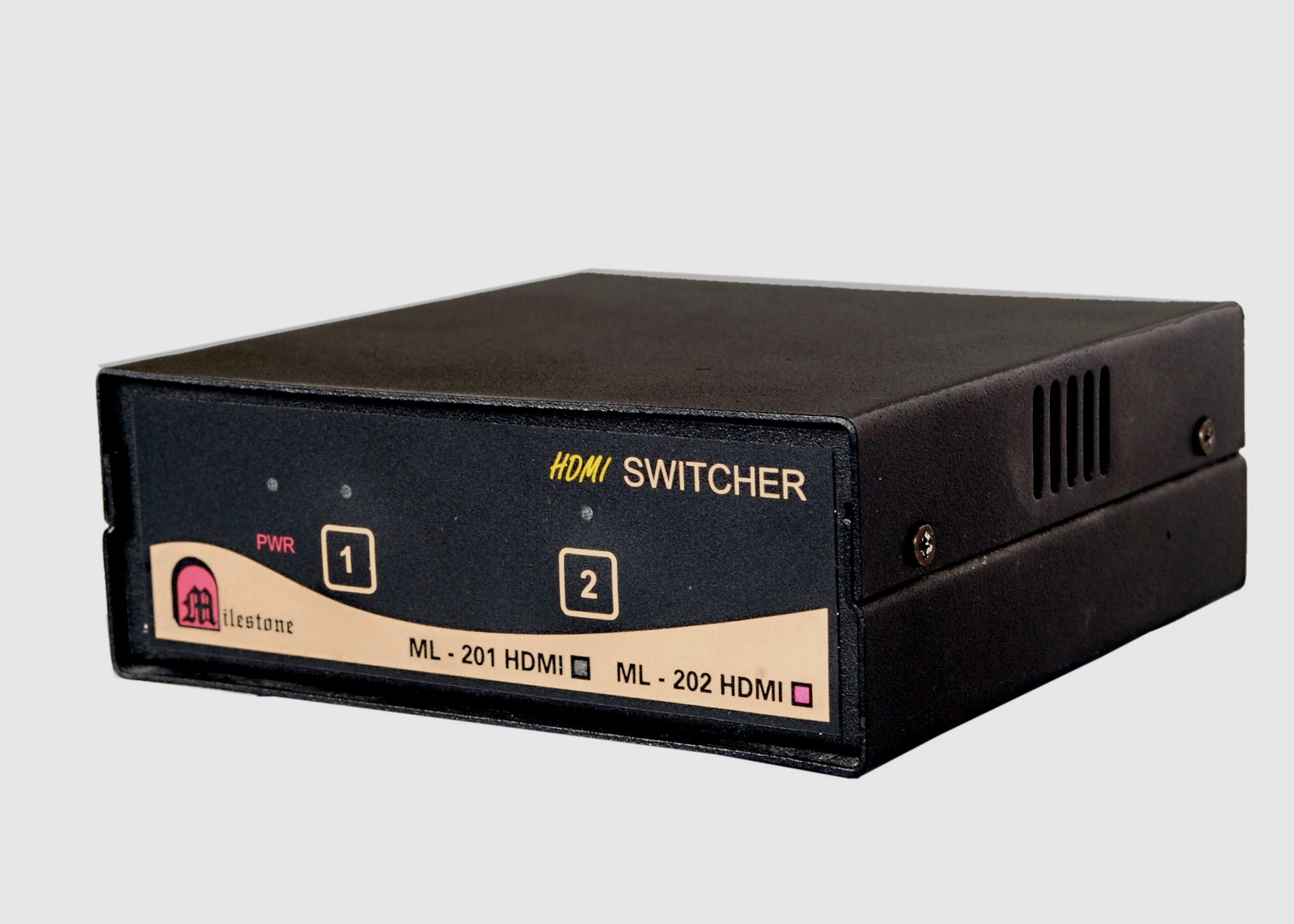
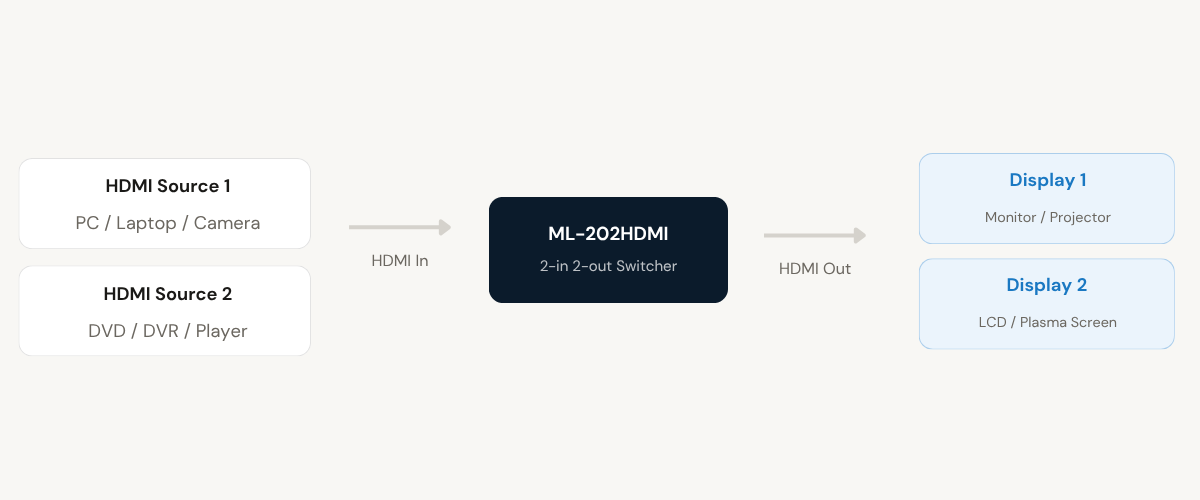
The ML-202HDMI is a 2-input, 2-output HDMI switcher that allows two HDMI sources to be shared across two displays simultaneously. It supports resolutions up to 1080P Full HD and provides multiple control methods including front panel keypad, built-in IR remote, RS232C interface, and Auto mode for automatic input selection.
- 2 HDMI inputs and 2 HDMI outputs for simultaneous dual-display operation
- Without Auto Fall Back, the display goes black until the default/fallback input is plugged out and in again.
- Supports resolutions up to 1080P Full HD, compatible with DVI inputs and outputs
- Multiple control options: front panel keypad, built-in IR remote with extender, RS232C, and Auto mode
- Remote keypad or contact closure operable at up to 30 metres via D9 male connector
- Scan mode and Manual mode available alongside Auto input selection
Max Resolution
1080p Full HD
Audio Input
Stereo Analogue
Output
Single HDMI
- In-house manufactured
- 2,000+ clients served
Product Overview
What the ML-202HDMI delivers
The ML-202HDMI is a 2-input, 2-output HDMI switcher manufactured by Milestone Electronics. It enables operators to connect two HDMI source devices such as computers, laptops, DVD players, DVRs, or cameras and route their signals to two displays simultaneously, including projectors, monitors, LCDs, or plasma screens equipped with HDMI ports.
The unit supports full 1080P HD resolution and is compatible with both HDMI and DVI inputs and outputs, providing flexibility in mixed AV environments. It employs equalization and re-clocking technology to maintain signal integrity across its output connections, ensuring a stable and clean image at the display end regardless of cable length within the specified system.
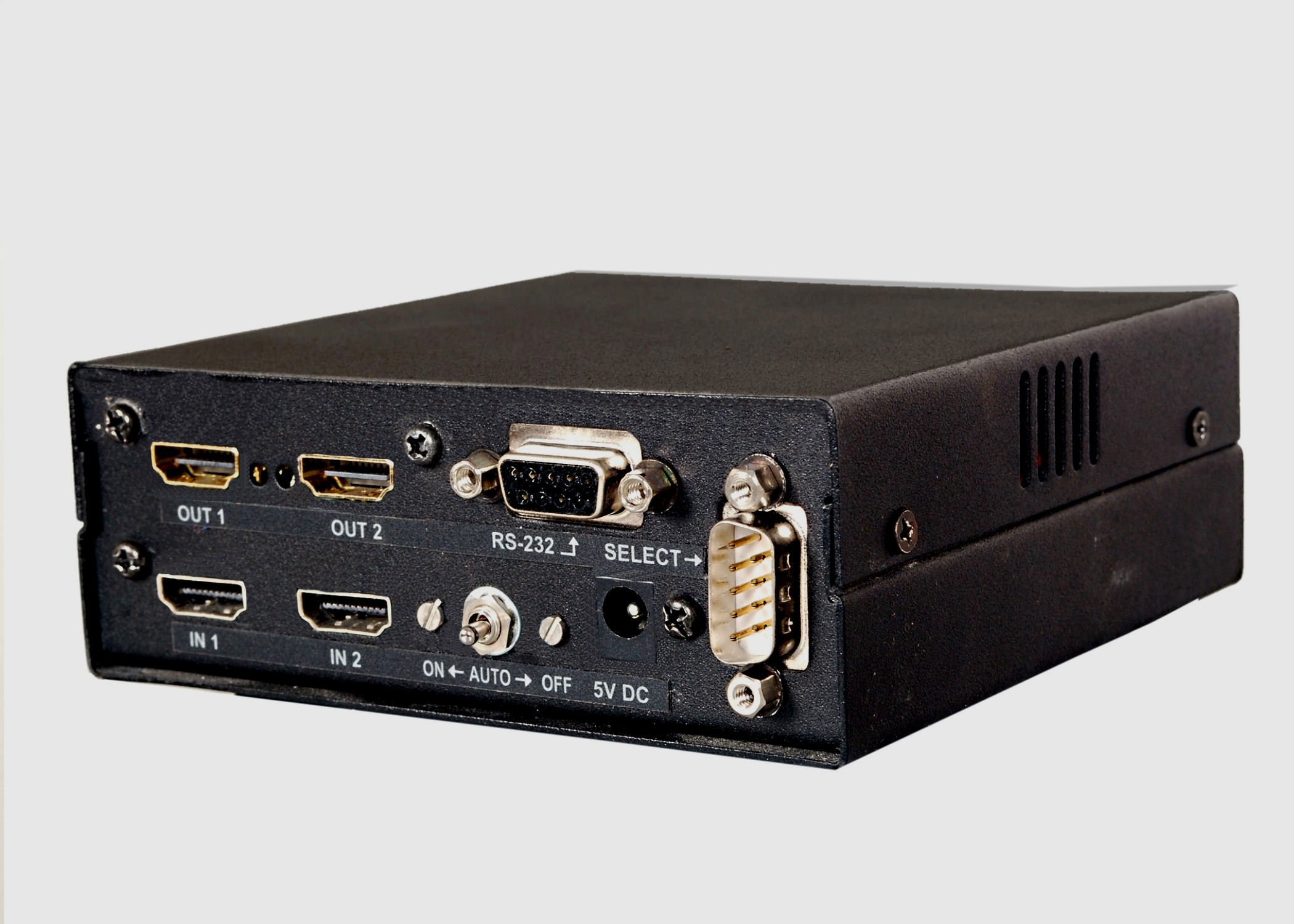
Control over input selection can be exercised through several methods. The front panel provides individual keypad buttons for direct channel selection. A built-in IR remote with a dedicated IR sensor on the front panel allows wireless channel switching, and an EP connector on the rear panel accommodates an IR extender cable for remote sensor placement up to 30 metres away. For integration with control systems, a D9 female RS232C interface on the rear panel accepts ASCII commands at 9600 baud for programmatic input selection. The rear panel also includes a D9 male connector for remote contact closure or a Milestone remote keypad, operational at distances up to 30 metres.
The ML-202HDMI supports three operating modes: Manual mode for direct keypad or remote selection, Auto mode for automatic detection and selection of the active input, and Scan mode which cycles through connected inputs at a configurable interval. LED indicators on the front panel display the active input channel, scan status, and power state at all times.
HDMI Inputs
Need a quote?
Our team responds within 24 hours with a tailored quote for your project or bulk order.
Key Features
2-in 2-out HDMI switching with multi-mode control
The ML-202HDMI provides dual-output HDMI switching at up to 1080P Full HD with a comprehensive set of input control options for standalone and integrated AV environments.
Dual HDMI Output for Simultaneous Display
The ML-202HDMI provides two HDMI outputs, allowing the selected input source to be displayed on two screens at the same time. This makes it suitable for setups requiring mirrored or shared output across multiple display devices in the same installation.
- 2 HDMI inputs selectable to 2 simultaneous HDMI outputs
- Supports projectors, monitors, LCDs, and plasma screens
- Compatible with DVI inputs and outputs in mixed environments
Auto Mode for Active Input Detection
The Auto mode, controlled via a rear panel switch, automatically detects and selects whichever input channel has a cable connected and an active source present. This eliminates manual switching in environments where source device connection status changes regularly.
- Auto input detection via rear panel Auto ON switch
- Selects active input automatically without user intervention
- Can be enabled or disabled independently of other control methods
RS232C Interface for Control System Integration
A D9 female RS232C connector on the rear panel enables channel selection through a control system or PC. Commands are transmitted using ASCII characters at 9600 baud, no parity, 8-bit, 1 stop bit. The unit also returns the selected channel command via the Tx line when any selection is made.
- D9 female RS232C interface, one per unit
- Communication: 9600 baud, no parity, 8-bit, 1 stop bit
- Channel feedback transmitted via RS232 Tx line on selection
Built-in IR Remote with Extended Sensor Option
An IR sensor on the front panel receives signals from the included IR remote for wireless channel selection. For installations where line-of-sight to the unit is not available, an EP connector on the rear panel accepts an optional IR extender cable, allowing the IR sensor to be placed at a distance of up to 30 metres from the unit.
- Built-in IR sensor on front panel for direct remote operation
- EP connector on rear for IR sensor cable extension up to 30 M
- IR remote included with the unit
Scan Mode with Configurable Dwell Time
Scan mode cycles through connected inputs sequentially, with a default dwell time of 20 seconds per channel. The unit enters scan mode when the rear panel slide switch is set to the scan position before power-on. Scanning can be stopped by pressing any channel key on the remote keypad and restarted using the scan key.
- Rear panel slide switch activates scan mode on power-on
- Default scan interval is 20 seconds per channel
- Front panel LED indicates scan mode status in real time
Remote Keypad and Contact Closure Support
The rear panel D9 male connector supports connection of a Milestone remote keypad or any external contact closure device such as an IR or RF remote. Channel selection is performed by momentarily shorting the relevant pin to ground. This connector is rated for operation at a distance of up to 30 metres from the unit.
- D9 male connector for remote keypad or contact closure
- Operable at up to 30 metres from the switcher
- Compatible with Milestone remote keypad, IR remote, or RF remote
Installation
Step-by-step connection procedure
The ML-202HDMI is designed for easy plug-and-play installation. Follow the connection sequence below to bring the unit into operation with your source and display devices.
01
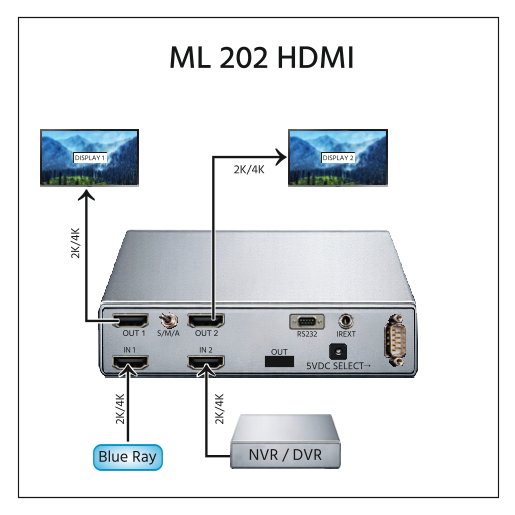
Connect HDMI Sources to the Switcher Inputs
Connect up to two HDMI source devices such as a computer, laptop, DVD player, DVR, or camera to the two HDMI input ports on the ML-202HDMI. The unit is compatible with DVI sources when using the appropriate HDMI-to-DVI adapter. Equalization and re-clocking technology in the unit maintains signal quality on both inputs.
02
Connect Displays to the Two HDMI Outputs
Connect two HDMI display devices such as projectors, monitors, LCD screens, or plasma displays to the two HDMI output ports on the unit. Both outputs carry the selected input signal simultaneously. DVI-compatible displays can be connected using a suitable HDMI-to-DVI adapter at the output.
03
Connect Optional Control Interfaces
If RS232C control is required, connect the control system or PC to the D9 female RS232C port on the rear panel. For remote keypad or contact closure operation, connect the remote keypad or contact closure device to the D9 male connector on the rear panel. For extended IR sensor placement, connect an IR extender cable to the EP connector on the rear panel.
04
Set Operating Mode and Apply Power
Set the rear panel Auto ON switch to enable Auto mode if automatic input selection is required. For Scan mode, set the rear panel slide switch to the scan position before powering on the unit. Apply 5V/2A DC power to the unit. The front panel LEDs will indicate the active input channel, scan status, and power state. Select channels using the front panel keypad, IR remote, RS232C commands, or the connected remote keypad.

Where the ML-202HDMI performs
Designed for professional environments where multiple HDMI sources must be shared across single or multiple displays with flexible, integrated control options.
Corporate Boardrooms and Meeting Rooms
Switch between a laptop, desktop PC, and video conferencing system for display on a projector and a confidence monitor in a boardroom. The built-in IR remote and RS232C interface allow integration with room automation systems for seamless source switching during meetings.
Classrooms and Training Facilities
Allow an instructor to switch between a teacher's PC and a student demonstration laptop, with the selected source displayed on both the classroom projector and a secondary monitor at the front of the room. Auto mode handles automatic source detection when laptops are connected or disconnected.
Control Rooms and Monitoring Stations
Route HDMI video from two source devices to two monitoring screens in a control room environment. RS232C integration enables the control system to switch sources programmatically based on operational state, while the scan mode provides sequential monitoring of connected sources.
Retail and Digital Signage Installations
Switch between a media player and a live feed source for simultaneous display on two screens in a retail showroom or digital signage installation. Scan mode can be used to cycle between connected sources automatically, while Auto mode ensures the active content source is always selected.
Presentation and Event AV Setups
Manage two presenter laptops or playback devices and distribute the selected source to a main projection screen and an operator preview monitor during live events or conferences. The remote keypad option allows the AV operator to switch sources from a distance of up to 30 metres away.
Hospitality and Hotel AV Systems
Provide guests or event organisers with the ability to connect two HDMI sources such as a laptop and a DVD player and switch between them on a room display and a secondary screen. The built-in IR remote with extender support allows control from anywhere within the room.
Full specification sheet
- Input and Output
- Control Interfaces
- RS232C Channel Commands
- Operating Modes
- Indication
- Physical and Power
FAQs about the ML-202HDMI
What does the ML-202HDMI do and what sources can be connected to it?
The ML-202HDMI is a 2-input, 2-output HDMI switcher. It allows two HDMI source devices to be connected simultaneously, with the selected input routed to two HDMI display outputs at the same time. Compatible source devices include computers, laptops, DVD players, DVRs, and cameras. Compatible displays include projectors, monitors, LCD screens, and plasma screens with HDMI ports. The unit also works with DVI sources and displays when a suitable adapter is used.
What is the difference between Auto mode and Manual mode on the ML-202HDMI?
In Manual mode, the operator selects the active input channel directly using the front panel keypad, the IR remote, the RS232C interface, or the remote keypad. The selected input remains active until a different input is chosen. In Auto mode, the unit automatically detects whichever input channel has a cable inserted and an active source present, and selects that channel without requiring manual intervention. Auto mode is enabled or disabled using a dedicated switch on the rear panel of the unit.
How does Scan mode work on the ML-202HDMI?
Scan mode causes the unit to cycle through connected input channels sequentially and display each one for a set dwell time before switching to the next. To activate scan mode, set the rear panel slide switch to the scan position before powering on the unit. The default scan interval is 20 seconds per channel. The front panel scan LED indicates when scan mode is active. To stop scanning, press any channel key on the remote keypad. To restart scanning, press the scan key on the remote keypad. Note that the ML-202HDMI does not support DIP switch-based channel selection or scan time adjustment, which is a feature available only on the 4-input and 8-input models in the range.
How do I control the ML-202HDMI using RS232C, and what commands are used?
The RS232C interface is accessed via the D9 female connector on the rear panel. Connect the control system or PC using a serial cable with pin 2 as Tx, pin 3 as Rx, and pin 5 as ground. Communication parameters are 9600 baud, no parity, 8-bit data, and 1 stop bit. To select Channel 1, send ASCII command “1!” (HEX 31, 21). To select Channel 2, send ASCII command “2!” (HEX 32, 21). When any channel is selected, whether through the front panel or another interface, the unit transmits the corresponding RS232C command back via the Tx line, allowing the control system to confirm the active channel.
How is the remote keypad or contact closure connected, and how does it work?
The remote keypad or contact closure device connects to the D9 male connector on the rear panel of the unit. This connector can be used with a Milestone remote keypad or any external contact closure device, including IR remote receivers or RF remote receivers. To select a channel, the corresponding pin on the D9 connector must be momentarily shorted to ground (pin 9). Pin 1 selects Channel 1 and pin 2 selects Channel 2. The remote keypad or contact closure can be operated at a distance of up to 30 metres from the unit.
Can the IR sensor be placed away from the unit, and how far can it reach?
Yes. The ML-202HDMI has a built-in IR sensor on the front panel for direct remote control. In addition, an EP connector is provided on the rear panel to accept an optional IR extender cable. This allows the IR sensor to be repositioned to a more accessible location, such as behind a rack panel or in a concealed equipment bay, while maintaining IR remote control from up to 30 metres away. The IR extender cable is an optional accessory and is not included as standard with the unit.
What LED indicators are available on the ML-202HDMI, and what do they indicate?
The ML-202HDMI has four LED indicators on the front panel. The CH1 LED illuminates when Channel 1 is the active input. The CH2 LED illuminates when Channel 2 is the active input. The Scan LED indicates when the unit is operating in scan mode, cycling through the connected inputs. The PWR LED confirms that the unit is powered on and operational. These indicators allow the operator to confirm the current operating state of the switcher at a glance without requiring any additional diagnostic equipment.
What is the difference between the ML-202HDMI and the ML-201HDMI, and when should each be used?
Both models have two HDMI inputs. The key difference is the number of outputs: the ML-201HDMI has a single HDMI output, while the ML-202HDMI has two HDMI outputs. The ML-201HDMI is suited to installations where only one display is needed, such as a single projector or monitor. The ML-202HDMI is the correct choice when the selected input must be displayed simultaneously on two screens, such as a projector and a confidence monitor, or two display panels in the same room. The power requirement also differs: the ML-201HDMI requires 5V/1A, while the ML-202HDMI requires 5V/2A due to the additional output circuitry.
Is the ML-202HDMI compatible with 4K source devices or displays?
No. The ML-202HDMI supports video resolutions up to 1080P Full HD only. It is not designed for 4K source or display equipment. If either the source device or the display is 4K-capable and cannot be set to output or accept 1080P or lower resolution, the ML-202HDMI should not be used in that configuration. For installations involving 4K source and destination equipment, Milestone offers other models in the HDMI product range that support 4K resolution. For the ML-202HDMI to function correctly, the source should be configured to output at 1080P or below.
Products you may also need
Ready to order or have a specific requirement?
Our team responds within 24 hours. Bulk pricing, custom solutions, and pan-India delivery are available. Talk to an engineer directly about your setup.